

File size: 368 MB
VMware InstallBuilder is a development tool for building cross-platform installers for desktop and server software. With InstallBuilder, you can quickly create dynamic, professional installers from a single project file and build environment. In addition to installers, InstallBuilder will generate RPM and Debian packages and multiplatform CDs/DVDs.
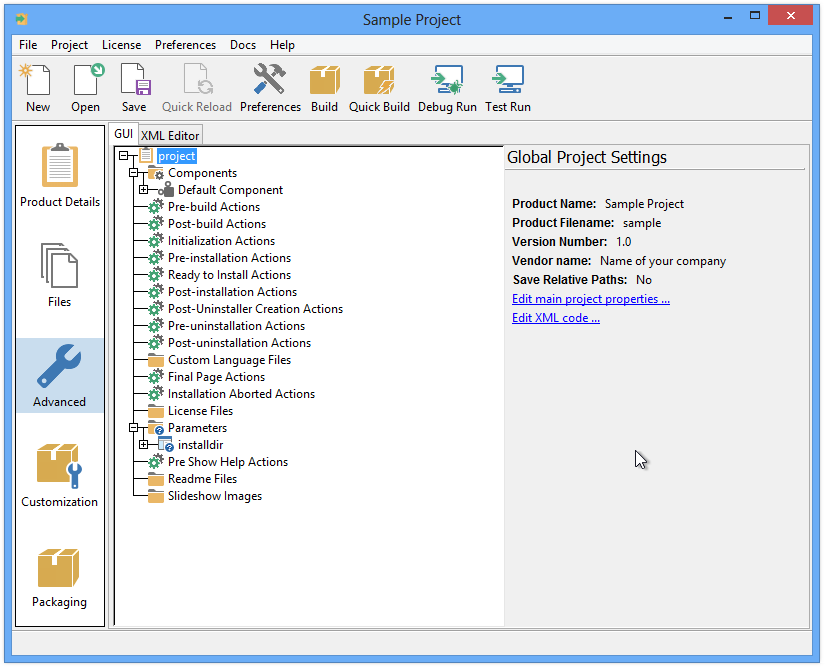
Powerful UI for Installer Development
Develop installers using the intuitive GUI or by editing XML-based installer project files.
Built-in actions automate adding commonly required functionality to installers.
Make platform-specific customizations while maintaining one project file for all platforms.
Installers for Any Desktop or Server Environment
Create installers for Linux, Windows, Mac OS X, Solaris, HP-UX, AIX, IRIX, FreeBSD and more.
Generate RPMs, Debian packages and multi-platform DVDs or CD-ROMs.
Installers run in GUI, text and unattended modes.
Developer-Friendly
Included debugger allows you test installers as you develop and pinpoint areas to troubleshoot.
Command line interface allows for integration with build and test systems.
"Human friendly" XML-based project files support source control integration and customizing installers using external scripts
Dynamic Parameter Support
Enhanced parameter support makes it possible to create dynamic pages that will be automatically reconfigured based on user’s input. This allows you to create a more customized and streamlined installation experience for users.
Enhanced Component Functionality
InstallBuilder provides support for downloadable components and component groups, including support for subcomponents. Downloadable components will be downloaded at runtime only if the user chooses to install them, reducing the size of installer downloads. The InstallBuilder component system allows you to group individual components and build feature sets that will be displayed in a tree structure ("subcomponents".) It also allows users to add and remove specific components from existing installations.
Expanded Documentation
Over 350 pages of documentation are now available for InstallBuilder. The documentation not only explains every feature of InstallBuilder, but also provides sample code for a wide variety of installer functions, such as bundling a Java runtime, detecting pre-requisites on the system, offering basic and advanced installation modes and more.
Screen :
What’s New
https://installbuilder.com/changelog
HOMEPAGE
https://installbuilder.com/
Free Download Link from Filestore : <br/> To support me, buy/renew your premium through my links : <br/> <br/> For free fast download in Filestore <br/> Use vpn or in your browser and choose Italy or germany then download your files <br/> <br/> Please disable Adblock
https://rapidgator.net/file/cb5e03ddd3cf118b6c61572b93a4ad3a